
SECURITY
Cloudflare’s AI Bot Changes: What Website Owners Should Check Before September 15
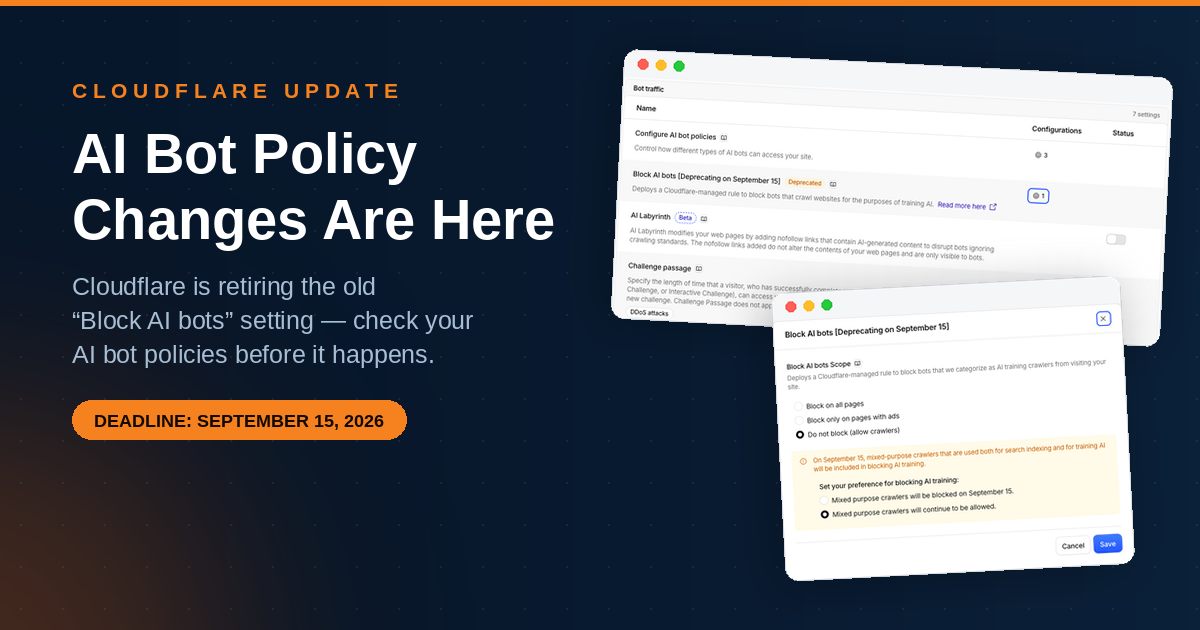
Cloudflare is changing how AI bots are handled on September 15, 2026. If you use Cloudflare, there is one part of this change that is particularly easy to misunderstand: AI bot controls currently appear in two different places in the Cloudflare dashboard.
The new AI bot policies give website owners more control over Search, Agent and Training crawlers. At the same time, the older Block AI bots setting is being deprecated, and the way mixed-purpose crawlers are handled is changing.
If you want to keep your website as open as possible to AI and search crawlers, it is worth checking your settings before September 15.
What is changing?
Cloudflare is moving from a simpler AI bot blocking model to more specific policies based on what a crawler is doing.
Under Security Settings > Configure AI bot policies, Cloudflare now provides three categories:
- Search – crawlers that collect or index your content so it can be used to answer questions about it later.
- Agent – automated activity acting in real time on behalf of a person, such as chat fetch bots and browser-use agents.
- Training – crawlers that take your content to train or fine-tune an AI model.
Cloudflare also explicitly includes mixed-purpose crawlers in the Training category when they are used for both Training and Search.
For each category, Cloudflare provides three options:
- Block – block the traffic across the entire zone.
- Block on pages with ads – block the traffic on pages where Cloudflare detects ads.
- Allow (do not block) – do not add a blocking rule.
So what is the confusing part?
The confusing part is that the new AI bot policies are not the only AI-related settings you may currently see in Cloudflare.
There is also an older setting called:
Block AI bots [Deprecating on September 15, 2026]
This is a separate Cloudflare-managed rule that blocks bots classified as AI training crawlers.
The older setting is being deprecated on September 15. Until now, it has also excluded mixed-purpose bots that are used for both Training and Search.
That means you can currently find AI-related settings in two different places in your Cloudflare dashboard, which makes it easy to assume that one setting controls all AI crawler traffic.
The three new AI bot categories
Search
Search crawlers collect or index content so that it can later be used to answer questions about that content.
If you want your website to remain discoverable through search engines and AI-powered search experiences, allowing Search crawlers may be important.
Agent
Agent traffic is different from traditional search crawling. These are automated systems acting in real time on behalf of a person.
For example, an AI assistant or browser-use system may retrieve information from a website while helping someone complete a task.
Training
Training crawlers collect website content for training or fine-tuning AI models.
This is the category where website owners may have very different opinions. Some may want to allow it, while others may want to block it while still allowing Search or Agent traffic.
What are mixed-purpose crawlers?
This is probably the most important part of the change to understand.
Not every crawler has one single purpose. Some crawlers can be used for both Search and AI Training.
Cloudflare calls these mixed-purpose crawlers.
Under the new AI bot policies, Cloudflare classifies mixed-purpose crawlers that are used for both Training and Search as part of the Training category.
This matters because the way Cloudflare handles these crawlers is changing as the old Block AI bots setting is deprecated.
What happens on September 15?
Cloudflare’s documentation states that on September 15, 2026, it will introduce updated defaults for new domains.
Under those defaults, bots classified as Training or Agent will be blocked on pages that display ads, while Search will remain allowed.
Cloudflare also states that mixed-purpose crawlers combining Search and Training will be included in configurations that block AI Training.
This is why website owners should not simply look at the word “AI” and assume that all AI crawlers will be treated in the same way.
What should you check in Cloudflare?
If you use Cloudflare, I recommend checking both areas of the dashboard.
1. Configure AI bot policies
Go to:
Security Settings > Configure AI bot policies
Review the three settings:
Search Allow / Block Agent Allow / Block Training Allow / Block
Cloudflare also provides the option to block only on pages with ads.
2. Check the older Block AI bots setting
You may also still see:
Block AI bots [Deprecating on September 15, 2026]
This is a separate setting and is worth checking before the change takes effect.
Cloudflare currently provides options including:
- Block on all pages
- Block only on pages with ads
- Do not block (allow crawlers)
What if you want to keep everything open?
This is the approach we prefer for our own websites.
Rather than automatically blocking an entire category of AI crawlers, we prefer to keep legitimate traffic open and deal with problematic traffic based on actual behavior.
For example, if a crawler generates excessive traffic, repeatedly requests the same pages, creates unnecessary server load or otherwise behaves abusively, it can be investigated and handled individually.
Depending on the situation, that might mean blocking a specific IP address, network, ASN or traffic pattern rather than blocking all AI crawlers.
There is no single correct approach for every website. Some publishers may have legal, licensing or business reasons for blocking AI training completely.
But if your goal is to remain as open as possible, it is important to make sure that Cloudflare’s different AI settings actually reflect that goal.
A simple example
Suppose your preference is:
- Allow Search crawlers
- Allow AI Agents
- Allow AI Training crawlers
- Deal with abusive traffic individually
Your new AI bot policies would therefore be set to:
Search Allow Agent Allow Training Allow
You would also want to make sure that the older AI bot configuration does not introduce a blocking policy that you did not intend.
Why this matters beyond AI training
The distinction between Search, Agent and Training is becoming increasingly important as the way people find information changes.
A crawler is no longer necessarily just a traditional search engine bot. AI systems can retrieve information in real time, search and index content, or collect content for model training.
These different uses can have very different implications for a website owner.
For that reason, having separate controls can ultimately be much more useful than a single “Block AI bots” switch.
Our recommendation
There is no universal setting that every website should use.
If you want maximum control over your content, review each AI category individually and decide what makes sense for your website.
If, like us, you prefer to keep your website as open as possible, allowing the different AI categories and then dealing with abusive traffic individually can be a sensible approach.
Most importantly, don’t assume that the first AI bot setting you find in Cloudflare tells you the complete story.
Check both the new “Configure AI bot policies” settings and the older “Block AI bots” setting before September 15.
Cloudflare’s documentation
Cloudflare has published its own documentation explaining the change and the different AI bot categories.
Stay in the loop with Entireweb
Get the latest updates delivered straight to your inbox. No spam - unsubscribe anytime.